
Copier lease ending
Lease ending? Plan the next one before it renews
A copier lease ends with a notice deadline, an old machine to remove and data on its drive. NYBS handles each step, whether your lease is with us or with another dealer.
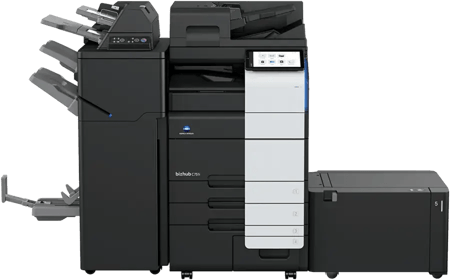
- Reading the lease and its notice deadline
- A free fleet review and written plan
- Erasing the old machine's data
- Removal at no charge when you replace it with us
120 daysThe best time to start, before the lease ends
Free reviewA written plan you keep either way
Data wipedBefore the old machine leaves
Free removalWhen you replace it with NYBS
Your options
Three ways a lease can end
Many copier leases need written notice before the end date, and some renew on their own without it. Send us the agreement and we'll mark the deadline. Comparing new quotes? See what decides a copier lease cost.
Replace the machine with one that fits how you print today. We check your volumes first, so you don't pay for capacity you won't use.
Start with a fleet review →Keep what fitsIf a machine still suits your office, we'll tell you. You decide what to do under the terms your lease allows.
Ask us to read your lease →Switch dealersComing from another dealer? We coordinate the old machine's removal and return with your dealer and leasing company.
How switching works →A typical timeline
From lease end date to new machine
Every lease is different. This is the usual rhythm when you start about four months out.
- 1About 120 days beforeSend us your lease
We read it with you and mark the notice deadline, end date and any buyout terms.
- 2About 90 days beforeFleet review
A rep walks your office, reads your volumes and gives you a written plan with the monthly cost.
- 3About 60 days beforeOrder and schedule
You choose the machines and we book delivery. In Manhattan we arrange the certificate of insurance and freight elevator.
- 4Install daySwap
The new machine goes in and onto your network. The old one's data is erased, and it leaves with us.
The old machine
Data erased, machine gone
An old copier holds scans, prints and address books on its drive. Here is what happens to it.
- We erase its stored dataBefore the machine leaves your office.
- We take it awayAt no charge when you replace it with a machine from NYBS.
- We handle the returnFor leases with another dealer, we coordinate with them and the leasing company.
Questions
Lease-ending questions we hear most
Rather talk it through?
Send us the lease or call, and a rep will walk you through the dates and your options.
(516) 739-0200info@nybs.comSend us your leaseWhat happens to the data on my old copier?
Before the old machine leaves your office, we erase its stored data.
Do you charge to remove the old machine?
No, not when you replace it with a machine from NYBS. We remove the old one at no charge.
My lease is with another dealer. Can you still help?
Yes. We read your current lease with you, coordinate the removal and return of the old machine with your dealer and leasing company, and install the new one.
When should we start?
About four months before your lease ends. That leaves time to meet any notice deadline, complete a fleet review and schedule delivery without rushing.
Can you also service the machines we keep?
Yes. NYBS services Konica Minolta, Canon and Kyocera machines, including ones we didn't sell.
Lease ending? Send us the agreement
Email your lease to info@nybs.com, or just tell us the end date, and a rep will mark the deadlines and set up your fleet review. Or call (516) 739-0200