
Charter · Faith-based · Private schools
Copiers that keep up with the school day
How many minutes did your teachers spend in line at the copier this week? Nobody's counting. We will.
Worksheets, test packets, parent letters and, in a dual-curriculum school, twice the material. NYBS sizes Konica Minolta machines to what your school really prints, from a 95-page-per-minute copy room machine to a 120-page-per-minute production press, and puts PaperCut on top so every page is counted.
 Pro-Tech Service Award11 consecutive years from Konica Minolta
What we tell schools first
The truth about school copiers
A dealer earns more when a school leases a bigger machine. Here's what we'd rather tell you before you sign anything.
An office copier dropped into a copy room wears out years early. A production press bought for a building that doesn't need it sits idle while you pay for it. Both mistakes start the same way: nobody looked at the meters first.
Ask your dealerWhat does our copy room actually print in a month?The price per page means nothing when packets aren't ready before first period. In a school, uptime in September, before midterms and before finals matters more than any line on a quote.
Ask your dealerWho shows up when it breaks, and how fast?When nobody sees who printed what, a 40-page packet gets printed for 300 students, half of it one-sided, and the extra copies end up in the recycling bin. You can't control what you can't see.
Ask your dealerCan we see printing by teacher and by grade?In a school, the copier isn't office equipment. It's classroom equipment. When it stops, teaching stops with it.
Size my copy roomSized to your volume
Konica Minolta, from the copy room to the print center
Schools have run on Konica Minolta black and white for years, and it's where we start. Which machine depends on one thing: how many pages your school prints, and where.
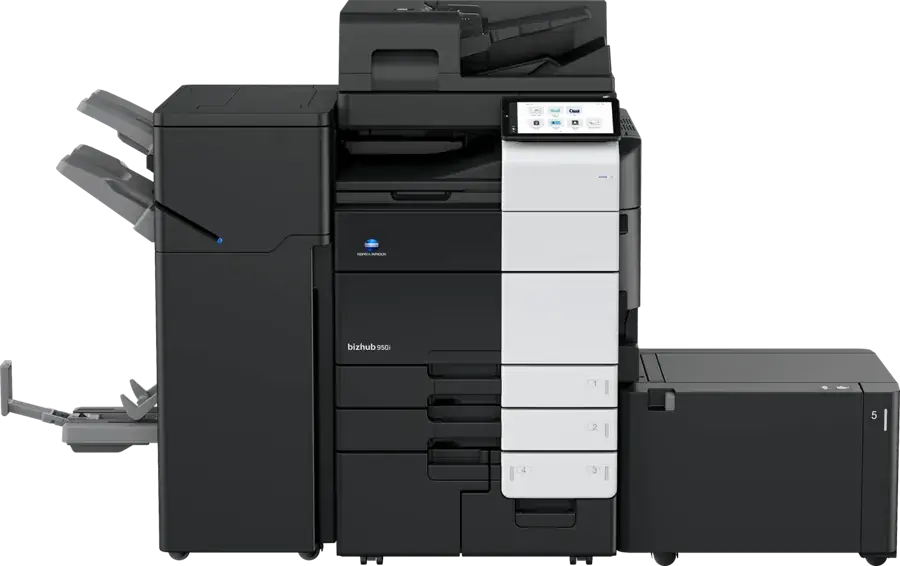
For a single building where teachers walk up and copy their own packets, and the main office needs one machine that never slows down.
- 3,650 sheets standard, 6,650 maximum
- Stapling up to 100 sheets, 20-sheet booklets, Z-fold
- Scans 280 images a minute double-sided
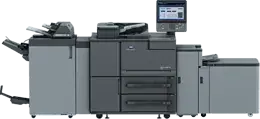
For a dedicated copy room run by a staff member, where test packets, booklets and parent mailings go out every week.
- Built for an average of 100,000 prints a month
- Paper up to 12×18, stock from 40 to 350 gsm
- Staple finishing and saddle-stitch booklets as volume grows
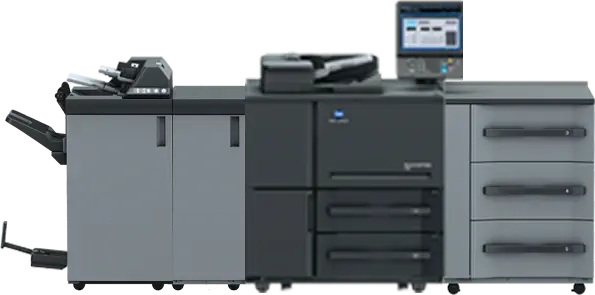
For a network of campuses printing from one central print center, where whole-grade test packets and books run every day.
- Up to 18,000 sheets of paper loaded
- Stock from 40 to 350 gsm, sheets up to 12.76×19.02 in
- Inline finishing for books, booklets and stapled sets
Need color for newsletters, flyers and the yearbook office? A bizhub i-Series color copier sits beside the black and white machine on the same PaperCut account. See the full Konica Minolta lineup →
PaperCut print management
Every page, accounted for
We lead every school with PaperCut. It turns the copier from a cost nobody can see into a budget line you control.
Give each teacher, department or grade a print allowance. Make two-sided and black and white the default, so paper and toner stretch further.
Jobs wait until the teacher signs in at the copier with a badge or PIN. Tests, IEPs and report cards are never left out for anyone to pick up.
PaperCut works with Google Workspace and Chromebooks, so staff and students print from the devices they already use without a driver hunt.
Reports by teacher, department, grade or campus show where the paper goes, so the next budget conversation starts with facts.
“Over the last fourteen months we’ve saved over $10,000 in unreleased paper savings alone.”
Little Rock School District, in a PaperCut case studyStudent privacy
The copier sees everything your school prints
Report cards, IEPs, health forms and tests all pass through it, and a copier keeps data on its drive. Schools answer to FERPA and New York Education Law 2-d, so the copier needs the same care as the laptop.
- Storage encryption, automatic deletion and data overwrite, built into bizhub machines and set up to Konica Minolta's guidance when you ask
- Badge or PIN release, so confidential pages only print for the person who sent them
- A sign-in record of who copied, printed and scanned, through PaperCut
- Stored data erased before an old machine ever leaves your building
Who we work with
Built for how New York schools really run
Charter networks and faith-based schools across New York already run their copy rooms on NYBS machines. Two very different schools, the same problem: more pages, less time, a tight budget.
Charter schools
A charter school buys on its own, with a board that wants to see where the money goes. You get a written plan in plain language, sized from your meters, that a board can read in five minutes. One partner covers every campus in a network, with one service desk and the same PaperCut setup at every site.
Faith-based and day schools
A dual curriculum means two sets of materials, long days and copy rooms that rarely rest. We put machines in that handle booklets and big runs without stopping, keep the toner coming, and plan installs around your calendar, religious holidays and summer included. Brooklyn delivery, building access and tight copy rooms are routine for our team.
Start here
A free print review for your school
You keep the written plan whether or not you work with us. If your current machine is the right one, we'll say so.
Book a print review- Walk the building
A rep sees every copier and printer, the copy room and where teachers actually print.
- Read the meters
We pull real volumes, so the plan is built on what your school prints, not a guess.
- Check every lease
Every lease and service contract listed with its end date, so nothing renews by surprise.
- Written plan
What to keep, replace or remove, with the monthly cost, in a page your board can read. No charge.
Questions
School copier questions we hear most
Which copier is right for a school copy room?
It depends on volume. A single building where teachers make their own copies is usually well served by a bizhub 950i at 95 pages a minute. A staffed copy room running weekly test packets and booklets fits the AccurioPrint 2100, built for an average of 100,000 prints a month. A central print center serving several campuses calls for the AccurioPress 7120 at 120 pages a minute. We read your meters before recommending any of them.
Can we limit how much each teacher prints?
Yes. With PaperCut you can set allowances by teacher, department or grade, make two-sided black and white the default, and see reports on who prints what.
Can students and staff print from Chromebooks?
Yes. PaperCut works with Google Workspace and Chromebooks, so staff and students print to the copier from the devices they already use.
How do you protect student information on the copier?
bizhub machines include storage encryption, automatic deletion and data overwrite, which we set up to Konica Minolta's guidance when your school asks. Badge or PIN release keeps confidential pages in the queue until the right person signs in, and we erase a machine's stored data before it leaves your building.
Can a school buy through a New York State contract?
NYBS is a NYS-certified MBE and a contractor on Konica Minolta's New York State contract for printing and imaging equipment. Whether your school can buy from it depends on the state's authorized user rules, so ask us and we'll check for your school.
Do you service the machines we already have?
Yes. NYBS services Konica Minolta, Canon and Kyocera machines we didn't sell, and we can replace them as their leases end.
Can installs happen when school is out?
Yes. We plan delivery and installation around your school calendar, so machines go in over a break or the summer instead of during class time.
Book a free print review for your school
Tell us how many buildings and copiers you have, and a rep will set up the walkthrough. Or call (516) 739-0200