
Kyocera · 11×17 color printer
ECOSYS PZ6000cix
60 ppm A3 color printer built for long runs and low upkeep
Who it's for
Who the ECOSYS PZ6000cix is built for.
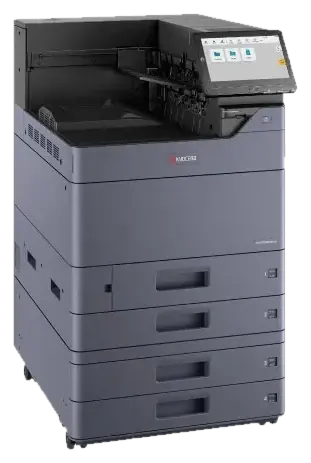
Offices that need a fast dedicated color printer for tabloid output, not a copier. It shares the TASKalfa paper handling, growing from 1,150 to 7,150 sheets, and accepts the same finishers, Z-fold and inserter. Kyocera's long-life amorphous silicon drum is rated up to 1.8 million pages, which keeps replacement parts and service visits down.
- ✓60 ppm letter in color and black; 1200 x 1200 dpi
- ✓Paper up to 12 x 18 in from trays and 12 x 48 in banners from the bypass tray
- ✓1,150 sheets standard, expandable to 7,150 sheets; automatic duplex standard
- ✓Long-life amorphous silicon drum rated up to 1.8 million pages
- ✓AI-based image processing sharpens small text, fine lines and low-resolution logos
- ✓4 GB memory and 256 GB storage; FIPS 140-3 compliant encryption
Models and speeds
| ECOSYS PZ6000cix | 60 ppm color/BW |
Speeds are the manufacturer's rated letter-size figures. Your rep will match the speed to your monthly volume; faster is not always the right answer.
Specifications
Specifications.
| Print speed | 60 ppm letter (color and BW) |
|---|---|
| Resolution | 1200 x 1200 dpi |
| Paper sizes | Trays: up to 12 x 18 in; MPT: up to 12 x 48 in banner |
| Paper capacity | 1,150 sheets standard / 7,150 sheets maximum |
| Duplex | Standard |
| Memory / storage | 4 GB RAM; 256 GB storage |
| Drum life | Amorphous silicon drum rated up to 1.8 million pages |
| Mobile & cloud | Kyocera Cloud Print and Scan compatible; remote maintenance monitoring |
Options and finishing
Build it for the work you actually do.
Paper decks, finishers, punch and fold units, controllers and security add-ons available for the ECOSYS PZ6000cix. Your rep configures these on the quote.
- PF-7140 dual 500-sheet paper trays
- PF-7150 dual 1,500-sheet paper trays (letter)
- PF-7120 3,000-sheet large capacity side tray (letter)
- Copier cabinet stand with stabilizer kit
- Banner Guide 10 banner paper feeding attachment
- DF-7120 1,000-sheet finisher
- DF-7140 4,000-sheet finisher (65-sheet staple)
- DF-7150 4,000-sheet finisher (100-sheet staple)
- BF-730 booklet and tri-folding unit for DF-7140
- BF-9100 booklet and tri-folding unit for DF-7150
- PH-7A punch unit for DF-7120 / DF-7140 / DF-7150
- MT-730 (B) 7-bin mailbox for DF-7140
- IS-7100 inserter unit
- ZF-7100 Z-fold unit
- JS-7100 job separator and JS-7110 inner shift tray
- UG-33 ThinPrint option
- UG-34 printer emulation option
- NK-7130 numeric keypad
- Keyboard Holder 10
- IB-53 Gigabit Ethernet board for dual NIC
- IB-54 wireless LAN interface (2.4 GHz / 5 GHz)
- IB-55 wireless LAN interface (2.4 GHz)
- IB-37 wireless LAN interface (2.4 GHz / 5 GHz) with Wi-Fi Direct
- IB-38 wireless LAN interface (2.4 GHz) with Wi-Fi Direct
- HD-22 (N) FIPS 140-3 compliant 256 GB SSD
- Card Authentication Kit (B)
Security
Locked down before it joins your network.
NYBS turns these on at install and supports them afterward.
- ✓Multilayer protection standard: data encryption, unauthorized access countermeasures and firmware tampering prevention
- ✓Supports encryption compliant with FIPS 140-3
- ✓Optional HD-22 (N) FIPS 140-3 compliant SSD
- ✓Optional Card Authentication Kit (B) for card-based user authentication
Same lineup
Other Kyocera models in this class.
Get a quote
Tell us what you run. We'll price the ECOSYS PZ6000cix for it.
A specialist reviews your volumes, color mix and finishing needs, then sends lease, service and per-page costs on one page. Mention the model in the message box.
Prefer to talk? (516) 739-0200, Garden City Park. Existing customer with a service or supply need? Use the NYBS Service portal.